Best Free Budgeting App for Canadians (2026)
Not free trials, not freemium traps — actually free options that work.
By Ahmad Jamal · Published January 9, 2026 · 12 min read
Quick Answer
Waypoint Budget's free tier is the best option for most Canadians. Full category budgeting, CSV imports, receipt scanning, smart auto-categorization, goal tracking, and unlimited manual transactions — no trial, no credit card, free forever.
I spent three months testing every budgeting app available to Canadians, focusing on what you actually get for $0. Not trials, not freemium teases. Here are the five that made the cut. (For a broader look at paid and free options, see our best budgeting apps for Canadians in 2026 roundup.)
In This Article
The Top 5 Actually-Free Options
Ranked by how useful the free tier is for everyday budgeting.
1. Waypoint Budget
Best OverallFull disclosure: I built Waypoint. But I designed the free tier to be genuinely useful — not a teaser.
FREE FEATURES
PLUS ($7.99 CAD/MO)
Why it stands out: A genuinely useful free tier — not a stripped-down teaser. You get full budgeting, goal tracking, receipt scanning, and smart categorization without paying anything.
The free tier includes everything you need to build a complete budget, track spending across categories, and see where your money goes — all without paying a cent. No bank sync on the free tier, so you manually enter transactions. But for many people, manual entry is better: you're more aware of your spending when you type it in.
2. Google Sheets Templates
WHAT YOU GET
LIMITATIONS
Best for: Spreadsheet lovers who want maximum control. Great if you're comfortable with formulas.
The classic DIY option. Thousands of free budget templates exist for Google Sheets, from simple expense trackers to complex zero-based budgets. You can find templates specifically designed for Canadian finances with CAD formatting. The downside is you build and maintain everything yourself.
3. Wealthica (Free Tier)
FREE FEATURES
LIMITATIONS
Best for: Tracking overall net worth and investments. Less useful for monthly budget management.
Wealthica is Canadian-built and works well with Canadian banks and investment platforms. The free tier includes 2 bank connections and focuses on net worth tracking and investment monitoring rather than day-to-day budgeting. Paid plans start at $50 CAD/year for a 3rd connection, with Premium at $150 CAD/year for unlimited connections and real-time stock prices.
4. PocketGuard
Update (Jan 2025): PocketGuard removed its free tier. It now offers a 7-day trial only — a paid subscription ($12.99 USD/mo or $74.99 USD/yr) is required after.
TRIAL FEATURES
LIMITATIONS
Best for: People willing to pay for a simple "how much can I spend?" view with automatic bank sync.
PocketGuard's signature feature is their "In My Pocket" calculation — income minus bills minus goals equals what you can spend. It supports some Canadian banks via Plaid, though sync reliability varies. Since removing the free tier in January 2025, it's no longer a truly free option, but the 7-day trial lets you test it before committing.
5. Goodbudget (Free Version)
FREE FEATURES
LIMITATIONS
Best for: People who love the envelope method and want a simple, proven system.
Based on the classic envelope budgeting method where you allocate money to different "envelopes" (categories). The free tier gives you 20 envelopes (10 regular + 10 annual/goal) and works in CAD. Premium ($10 USD/month) adds unlimited envelopes and automatic bank sync via Plaid — a feature added in August 2024.
Side-by-Side Comparison
| Feature | Waypoint | Sheets | Wealthica | PocketGuard | Goodbudget |
|---|---|---|---|---|---|
| Cost (Free Tier) | Trial only | ||||
| Category Budgets | Limited | 20 max | |||
| Bank Sync (Free) | 2 banks | Trial only | |||
| Canadian-Focused | Diy | Us | |||
| Mobile App | Web | ||||
| Learning Curve | Low | High | Low | Very low | Medium |
What Actually Counts as "Free"?
What You Actually Need (And Don't)
You Need
- Category budgets (groceries, rent, etc.)
- Clear budget vs. actual each month
- Easy transaction entry
- Something you'll actually use
You Probably Don't
- Investment tracking (unless you trade)
- 50+ spending categories
- 12-month forecasting
- Bill negotiation or credit monitoring
The Bank Sync Question
About 40% of Waypoint users prefer manual entry — even when they have access to sync. Here's why:
Awareness
Manually entering a $47 grocery run makes you think about it. Auto-sync doesn't.
Privacy
Some people don't want to connect bank accounts to third-party apps.
Control
Categorize as transactions happen, not days later when you've forgotten.
Simplicity
One checking + two credit cards? Manual entry takes 2 minutes a day.
That said, if you have 5+ accounts, bank sync is worth paying for. Start free, upgrade if you need it.
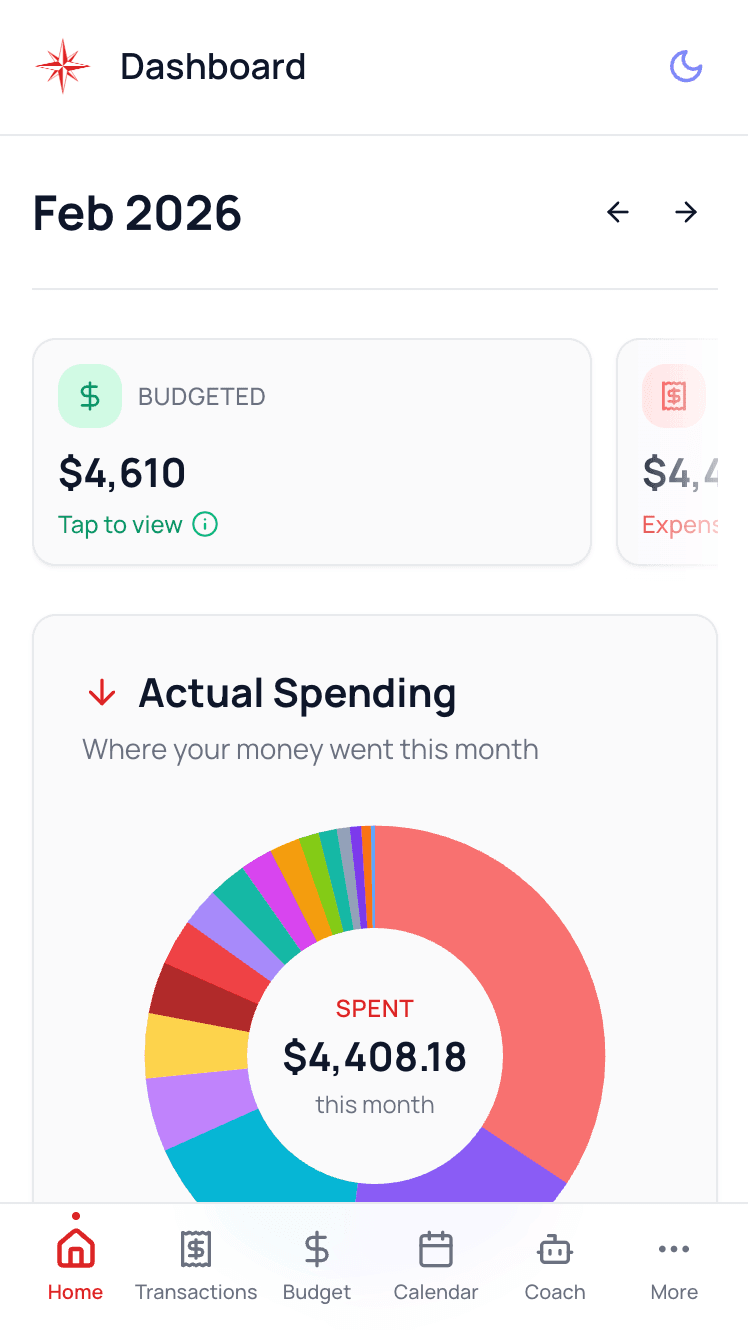
See It in Action
Clean, simple budgeting — built for Canadians.
My Recommendation: Start Here
1Start with Waypoint Budget (Free)
Full category budgeting, smart bill assignment, unlimited manual transactions. Try it for a month — upgrade to Plus ($7.99 CAD/mo) only if you want bank sync.
2Alternative: Google Sheets
Love spreadsheets? Search for "zero-based budget template Canada" and pick one. Free forever and infinitely customizable.
3Want Free Bank Sync?
Wealthica's free tier includes 2 bank connections for net worth tracking. For actual budgeting with bank sync, Waypoint Plus ($7.99 CAD/mo) or Goodbudget Premium ($10 USD/mo) are your best options.
Common Questions
Is free budgeting software safe?
Generally yes, especially from known companies. Look for bank-level encryption and read their privacy policy. If you're using manual entry only, there's virtually no risk.
Why pay for budgeting when free options exist?
Convenience. Bank sync saves time, smart insights catch patterns you miss. But if the free tier does what you need — don't pay.
Can I switch from a free app to a paid one later?
Absolutely. Most apps let you export data. Budgets reset monthly anyway. Try 2-3 free options before committing to a subscription.
Do free budgeting apps work on iPhone and Android?
Most do. Waypoint Budget, PocketGuard, and Goodbudget all work on both platforms. Google Sheets works everywhere.
What is the best free budgeting app for Canadians?
Waypoint Budget offers a genuinely free tier with unlimited manual transactions, all budget categories, and smart bill assignment for any pay schedule.
Do free budgeting apps support Canadian banks?
Waypoint Budget free uses manual entry. Wealthica free supports 2 bank connections. PocketGuard no longer has a free tier (7-day trial only). Goodbudget free is manual-entry only (Premium adds bank sync). Google Sheets doesn't offer bank sync.
The Bottom Line
You don't need to pay $15-20/month to budget effectively. Start free, stay free if it works, and only upgrade if you genuinely need bank sync. Coming from a paid app? See our free YNAB alternatives or Mint replacements. The best budget is one you'll stick with.
Ready to start budgeting for $0?
Full category budgets, smart bill assignment, unlimited manual transactions — completely free.
No credit card required · Free forever · Upgrade only if you want bank sync
Keep Reading
Disclaimer
This article is for informational purposes only and represents the author's personal experience and opinions. Pricing, features, and availability of third-party services mentioned may change without notice. While we strive for accuracy, we make no guarantees about the completeness or reliability of this information. Always verify current details directly with service providers before making financial decisions. This content does not constitute financial advice.
You're in good company
Don't take our word for it. See what people are saying about us on Trustpilot.
Trusted by 5,000+ budgeters
Georgette
I have been looking for a way to budget as I look move towards retirement. I had tried YNAB, MINT, and a few others, but found them too complicated. When I came upon Waypoint Budget, the first thing I liked was the clean look of the website. It is easy to navigate between the different tools. I now actually enjoy keeping track of my finances.
Fargo6
The developer responded quickly when I had issues with importing transactions and linking banks. They implemented fixes right away and followed up with me. This is an active development team that truly cares about their product. 5 stars for trust.
Jodi Harbarenko
What an incredible find Waypoint Budget is! As a former MINT and YNAB user, I was searching for an affordable Canadian budgeting app with straightforward features—and Waypoint delivers exactly that. The dashboard is clean and easy to navigate, and connecting my bank accounts was seamless. What really sets Waypoint apart is the founder's incredible responsiveness and genuine care for user feedback. I've never experienced this level of support with any other budgeting tool. Highly recommend!
Kerem
Great budgeting app with very active development team! I've been using it for over 5 months and very happy with the user experience. The paid feature to use Plaid to sync bank transactions is worth considering on its own. Filters credit card payment and receive transactions well enough by itself and provides a lot of customization.
Tony S Pietromonaco
Great product and excellent customer service
Valerie
I'm a senior with a bit of bookkeeping experience from long ago. That's relevant because I am thrilled to bits that I have found Waypoint to be so easy to use. Of course, there is a learning curve, but between Waypoint themselves and ChatGPT, I've been able to navigate the whole thing. I highly recommend Waypoint -- it's designed for Canadians, which is huge for me, and designed with privacy integrity as well.
Georgette
I have been looking for a way to budget as I look move towards retirement. I had tried YNAB, MINT, and a few others, but found them too complicated. When I came upon Waypoint Budget, the first thing I liked was the clean look of the website. It is easy to navigate between the different tools. I now actually enjoy keeping track of my finances.
Fargo6
The developer responded quickly when I had issues with importing transactions and linking banks. They implemented fixes right away and followed up with me. This is an active development team that truly cares about their product. 5 stars for trust.
Jodi Harbarenko
What an incredible find Waypoint Budget is! As a former MINT and YNAB user, I was searching for an affordable Canadian budgeting app with straightforward features—and Waypoint delivers exactly that. The dashboard is clean and easy to navigate, and connecting my bank accounts was seamless. What really sets Waypoint apart is the founder's incredible responsiveness and genuine care for user feedback. I've never experienced this level of support with any other budgeting tool. Highly recommend!
Kerem
Great budgeting app with very active development team! I've been using it for over 5 months and very happy with the user experience. The paid feature to use Plaid to sync bank transactions is worth considering on its own. Filters credit card payment and receive transactions well enough by itself and provides a lot of customization.
Tony S Pietromonaco
Great product and excellent customer service
Valerie
I'm a senior with a bit of bookkeeping experience from long ago. That's relevant because I am thrilled to bits that I have found Waypoint to be so easy to use. Of course, there is a learning curve, but between Waypoint themselves and ChatGPT, I've been able to navigate the whole thing. I highly recommend Waypoint -- it's designed for Canadians, which is huge for me, and designed with privacy integrity as well.
Ayla Bee
A great replacement for MINT and more intuitive than MINT was!
Mike
This app makes budgeting and tracking your money simple. It is intuitive and well developed. But what really makes this app head and shoulders above other apps is the developers desire to make it better. Not only did they reply back to questions I had about certain functions (I find it rare that app developers even respond to emails or messages), they made changes to the app to address these issues. Amazing!!
Byra Dineshkumar
As someone who is still a beginner when it comes to personal finance and budgeting, I've found Waypoint to be incredibly helpful in terms of making the process of tracking expenses and learning how to budget less daunting. I haven't upgraded to being able to sync banking transactions just yet, but even the process of manually entering my expenses, and having a clear visual of where I'm at and my goals has been empowering. I especially love the dashboard, the user interface is easy to navigate. Excited to continue to explore the different features Waypoint has to offer, and to see the platform grow as whole :)
Johnny D.
It's a really great tool to get you started on your budgeting journey. Easy to understand and navigate, easy to customize. On top of that they have rapid customer service - when I had questions they would respond within 24h-48h. Impressive stuff! Keep doing what you're doing.
Chad
This is the best Canadian budgeting platform I've used so far. I've tried many other budgeting platforms, but always ended up going back to my spreadsheets-until now. the layout is clean and intuitive, and its incredibly simple and efficient to use. waypoint budget finally gives me everything i liked about with my spreadsheets, without the hassle.
Jacques Persoons
Finally find an app that suits all our needs. Quite Simple to use and very intuitive. I tried few other apps that were WAY TO COMPLICATED! It is also well adapted for Canadians. Customer service is also top of the line…
Ayla Bee
A great replacement for MINT and more intuitive than MINT was!
Mike
This app makes budgeting and tracking your money simple. It is intuitive and well developed. But what really makes this app head and shoulders above other apps is the developers desire to make it better. Not only did they reply back to questions I had about certain functions (I find it rare that app developers even respond to emails or messages), they made changes to the app to address these issues. Amazing!!
Byra Dineshkumar
As someone who is still a beginner when it comes to personal finance and budgeting, I've found Waypoint to be incredibly helpful in terms of making the process of tracking expenses and learning how to budget less daunting. I haven't upgraded to being able to sync banking transactions just yet, but even the process of manually entering my expenses, and having a clear visual of where I'm at and my goals has been empowering. I especially love the dashboard, the user interface is easy to navigate. Excited to continue to explore the different features Waypoint has to offer, and to see the platform grow as whole :)
Johnny D.
It's a really great tool to get you started on your budgeting journey. Easy to understand and navigate, easy to customize. On top of that they have rapid customer service - when I had questions they would respond within 24h-48h. Impressive stuff! Keep doing what you're doing.
Chad
This is the best Canadian budgeting platform I've used so far. I've tried many other budgeting platforms, but always ended up going back to my spreadsheets-until now. the layout is clean and intuitive, and its incredibly simple and efficient to use. waypoint budget finally gives me everything i liked about with my spreadsheets, without the hassle.
Jacques Persoons
Finally find an app that suits all our needs. Quite Simple to use and very intuitive. I tried few other apps that were WAY TO COMPLICATED! It is also well adapted for Canadians. Customer service is also top of the line…
Barbara Whittaker
Wonderful experience excellent customer support and product!!
Kristin Gyuran
New to this app and love it. I really appreciate how you can interact with the creators to ask questions and recommend improvements. I find it easy to use and it syncs with my bank easily. Would highly recommend to anyone wishing to be more mindful with their money.
Stevie Baker
Waypoint is amazing. It's intuitive and easy to use. It allows you to set goals, track budget lines, group things together into categories and shows pie charts of the percentages of your budget. You can set goals and feel completely in control and informed. It's an excellent budgeting app the the customer service is second to none.
J.P. Métivier
Outstanding product built by an attentive and responsive team. By far the best budgeting tool I've tried. I wish they had a referral program because I'm already referring it to my close circle.
Ahmed H.
Just what I was looking for. Pulls transactions directly from my canadian bank accounts (works great for scotiabank and cibc), simple and clean design, ability to budget, track and compile reports on spending per category/month/year etc. Best such product out there for Canadians.
James W
One of the best budgeting apps I've used. Not unnecessarily invasive, functional, adaptable. Developing and updating faster than the issues can annoy you. Canadian made is also a huge bonus. Keep up the stellar work team!
Barbara Whittaker
Wonderful experience excellent customer support and product!!
Kristin Gyuran
New to this app and love it. I really appreciate how you can interact with the creators to ask questions and recommend improvements. I find it easy to use and it syncs with my bank easily. Would highly recommend to anyone wishing to be more mindful with their money.
Stevie Baker
Waypoint is amazing. It's intuitive and easy to use. It allows you to set goals, track budget lines, group things together into categories and shows pie charts of the percentages of your budget. You can set goals and feel completely in control and informed. It's an excellent budgeting app the the customer service is second to none.
J.P. Métivier
Outstanding product built by an attentive and responsive team. By far the best budgeting tool I've tried. I wish they had a referral program because I'm already referring it to my close circle.
Ahmed H.
Just what I was looking for. Pulls transactions directly from my canadian bank accounts (works great for scotiabank and cibc), simple and clean design, ability to budget, track and compile reports on spending per category/month/year etc. Best such product out there for Canadians.
James W
One of the best budgeting apps I've used. Not unnecessarily invasive, functional, adaptable. Developing and updating faster than the issues can annoy you. Canadian made is also a huge bonus. Keep up the stellar work team!
Georgette
I have been looking for a way to budget as I look move towards retirement. I had tried YNAB, MINT, and a few others, but found them too complicated. When I came upon Waypoint Budget, the first thing I liked was the clean look of the website. It is easy to navigate between the different tools. I now actually enjoy keeping track of my finances.
Barbara Whittaker
Wonderful experience excellent customer support and product!!
Mike
This app makes budgeting and tracking your money simple. It is intuitive and well developed. But what really makes this app head and shoulders above other apps is the developers desire to make it better. Not only did they reply back to questions I had about certain functions (I find it rare that app developers even respond to emails or messages), they made changes to the app to address these issues. Amazing!!
Jodi Harbarenko
What an incredible find Waypoint Budget is! As a former MINT and YNAB user, I was searching for an affordable Canadian budgeting app with straightforward features—and Waypoint delivers exactly that. The dashboard is clean and easy to navigate, and connecting my bank accounts was seamless. What really sets Waypoint apart is the founder's incredible responsiveness and genuine care for user feedback. I've never experienced this level of support with any other budgeting tool. Highly recommend!
Stevie Baker
Waypoint is amazing. It's intuitive and easy to use. It allows you to set goals, track budget lines, group things together into categories and shows pie charts of the percentages of your budget. You can set goals and feel completely in control and informed. It's an excellent budgeting app the the customer service is second to none.
Johnny D.
It's a really great tool to get you started on your budgeting journey. Easy to understand and navigate, easy to customize. On top of that they have rapid customer service - when I had questions they would respond within 24h-48h. Impressive stuff! Keep doing what you're doing.
Tony S Pietromonaco
Great product and excellent customer service
Ahmed H.
Just what I was looking for. Pulls transactions directly from my canadian bank accounts (works great for scotiabank and cibc), simple and clean design, ability to budget, track and compile reports on spending per category/month/year etc. Best such product out there for Canadians.
Jacques Persoons
Finally find an app that suits all our needs. Quite Simple to use and very intuitive. I tried few other apps that were WAY TO COMPLICATED! It is also well adapted for Canadians. Customer service is also top of the line…
Georgette
I have been looking for a way to budget as I look move towards retirement. I had tried YNAB, MINT, and a few others, but found them too complicated. When I came upon Waypoint Budget, the first thing I liked was the clean look of the website. It is easy to navigate between the different tools. I now actually enjoy keeping track of my finances.
Barbara Whittaker
Wonderful experience excellent customer support and product!!
Mike
This app makes budgeting and tracking your money simple. It is intuitive and well developed. But what really makes this app head and shoulders above other apps is the developers desire to make it better. Not only did they reply back to questions I had about certain functions (I find it rare that app developers even respond to emails or messages), they made changes to the app to address these issues. Amazing!!
Jodi Harbarenko
What an incredible find Waypoint Budget is! As a former MINT and YNAB user, I was searching for an affordable Canadian budgeting app with straightforward features—and Waypoint delivers exactly that. The dashboard is clean and easy to navigate, and connecting my bank accounts was seamless. What really sets Waypoint apart is the founder's incredible responsiveness and genuine care for user feedback. I've never experienced this level of support with any other budgeting tool. Highly recommend!
Stevie Baker
Waypoint is amazing. It's intuitive and easy to use. It allows you to set goals, track budget lines, group things together into categories and shows pie charts of the percentages of your budget. You can set goals and feel completely in control and informed. It's an excellent budgeting app the the customer service is second to none.
Johnny D.
It's a really great tool to get you started on your budgeting journey. Easy to understand and navigate, easy to customize. On top of that they have rapid customer service - when I had questions they would respond within 24h-48h. Impressive stuff! Keep doing what you're doing.
Tony S Pietromonaco
Great product and excellent customer service
Ahmed H.
Just what I was looking for. Pulls transactions directly from my canadian bank accounts (works great for scotiabank and cibc), simple and clean design, ability to budget, track and compile reports on spending per category/month/year etc. Best such product out there for Canadians.
Jacques Persoons
Finally find an app that suits all our needs. Quite Simple to use and very intuitive. I tried few other apps that were WAY TO COMPLICATED! It is also well adapted for Canadians. Customer service is also top of the line…
Ayla Bee
A great replacement for MINT and more intuitive than MINT was!
Fargo6
The developer responded quickly when I had issues with importing transactions and linking banks. They implemented fixes right away and followed up with me. This is an active development team that truly cares about their product. 5 stars for trust.
Kristin Gyuran
New to this app and love it. I really appreciate how you can interact with the creators to ask questions and recommend improvements. I find it easy to use and it syncs with my bank easily. Would highly recommend to anyone wishing to be more mindful with their money.
Byra Dineshkumar
As someone who is still a beginner when it comes to personal finance and budgeting, I've found Waypoint to be incredibly helpful in terms of making the process of tracking expenses and learning how to budget less daunting. I haven't upgraded to being able to sync banking transactions just yet, but even the process of manually entering my expenses, and having a clear visual of where I'm at and my goals has been empowering. I especially love the dashboard, the user interface is easy to navigate. Excited to continue to explore the different features Waypoint has to offer, and to see the platform grow as whole :)
Kerem
Great budgeting app with very active development team! I've been using it for over 5 months and very happy with the user experience. The paid feature to use Plaid to sync bank transactions is worth considering on its own. Filters credit card payment and receive transactions well enough by itself and provides a lot of customization.
J.P. Métivier
Outstanding product built by an attentive and responsive team. By far the best budgeting tool I've tried. I wish they had a referral program because I'm already referring it to my close circle.
Chad
This is the best Canadian budgeting platform I've used so far. I've tried many other budgeting platforms, but always ended up going back to my spreadsheets-until now. the layout is clean and intuitive, and its incredibly simple and efficient to use. waypoint budget finally gives me everything i liked about with my spreadsheets, without the hassle.
Valerie
I'm a senior with a bit of bookkeeping experience from long ago. That's relevant because I am thrilled to bits that I have found Waypoint to be so easy to use. Of course, there is a learning curve, but between Waypoint themselves and ChatGPT, I've been able to navigate the whole thing. I highly recommend Waypoint -- it's designed for Canadians, which is huge for me, and designed with privacy integrity as well.
James W
One of the best budgeting apps I've used. Not unnecessarily invasive, functional, adaptable. Developing and updating faster than the issues can annoy you. Canadian made is also a huge bonus. Keep up the stellar work team!
Ayla Bee
A great replacement for MINT and more intuitive than MINT was!
Fargo6
The developer responded quickly when I had issues with importing transactions and linking banks. They implemented fixes right away and followed up with me. This is an active development team that truly cares about their product. 5 stars for trust.
Kristin Gyuran
New to this app and love it. I really appreciate how you can interact with the creators to ask questions and recommend improvements. I find it easy to use and it syncs with my bank easily. Would highly recommend to anyone wishing to be more mindful with their money.
Byra Dineshkumar
As someone who is still a beginner when it comes to personal finance and budgeting, I've found Waypoint to be incredibly helpful in terms of making the process of tracking expenses and learning how to budget less daunting. I haven't upgraded to being able to sync banking transactions just yet, but even the process of manually entering my expenses, and having a clear visual of where I'm at and my goals has been empowering. I especially love the dashboard, the user interface is easy to navigate. Excited to continue to explore the different features Waypoint has to offer, and to see the platform grow as whole :)
Kerem
Great budgeting app with very active development team! I've been using it for over 5 months and very happy with the user experience. The paid feature to use Plaid to sync bank transactions is worth considering on its own. Filters credit card payment and receive transactions well enough by itself and provides a lot of customization.
J.P. Métivier
Outstanding product built by an attentive and responsive team. By far the best budgeting tool I've tried. I wish they had a referral program because I'm already referring it to my close circle.
Chad
This is the best Canadian budgeting platform I've used so far. I've tried many other budgeting platforms, but always ended up going back to my spreadsheets-until now. the layout is clean and intuitive, and its incredibly simple and efficient to use. waypoint budget finally gives me everything i liked about with my spreadsheets, without the hassle.
Valerie
I'm a senior with a bit of bookkeeping experience from long ago. That's relevant because I am thrilled to bits that I have found Waypoint to be so easy to use. Of course, there is a learning curve, but between Waypoint themselves and ChatGPT, I've been able to navigate the whole thing. I highly recommend Waypoint -- it's designed for Canadians, which is huge for me, and designed with privacy integrity as well.
James W
One of the best budgeting apps I've used. Not unnecessarily invasive, functional, adaptable. Developing and updating faster than the issues can annoy you. Canadian made is also a huge bonus. Keep up the stellar work team!
Georgette
I have been looking for a way to budget as I look move towards retirement. I had tried YNAB, MINT, and a few others, but found them too complicated. When I came upon Waypoint Budget, the first thing I liked was the clean look of the website. It is easy to navigate between the different tools. I now actually enjoy keeping track of my finances.
Ayla Bee
A great replacement for MINT and more intuitive than MINT was!
Barbara Whittaker
Wonderful experience excellent customer support and product!!
Fargo6
The developer responded quickly when I had issues with importing transactions and linking banks. They implemented fixes right away and followed up with me. This is an active development team that truly cares about their product. 5 stars for trust.
Mike
This app makes budgeting and tracking your money simple. It is intuitive and well developed. But what really makes this app head and shoulders above other apps is the developers desire to make it better. Not only did they reply back to questions I had about certain functions (I find it rare that app developers even respond to emails or messages), they made changes to the app to address these issues. Amazing!!
Kristin Gyuran
New to this app and love it. I really appreciate how you can interact with the creators to ask questions and recommend improvements. I find it easy to use and it syncs with my bank easily. Would highly recommend to anyone wishing to be more mindful with their money.
Jodi Harbarenko
What an incredible find Waypoint Budget is! As a former MINT and YNAB user, I was searching for an affordable Canadian budgeting app with straightforward features—and Waypoint delivers exactly that. The dashboard is clean and easy to navigate, and connecting my bank accounts was seamless. What really sets Waypoint apart is the founder's incredible responsiveness and genuine care for user feedback. I've never experienced this level of support with any other budgeting tool. Highly recommend!
Byra Dineshkumar
As someone who is still a beginner when it comes to personal finance and budgeting, I've found Waypoint to be incredibly helpful in terms of making the process of tracking expenses and learning how to budget less daunting. I haven't upgraded to being able to sync banking transactions just yet, but even the process of manually entering my expenses, and having a clear visual of where I'm at and my goals has been empowering. I especially love the dashboard, the user interface is easy to navigate. Excited to continue to explore the different features Waypoint has to offer, and to see the platform grow as whole :)
Stevie Baker
Waypoint is amazing. It's intuitive and easy to use. It allows you to set goals, track budget lines, group things together into categories and shows pie charts of the percentages of your budget. You can set goals and feel completely in control and informed. It's an excellent budgeting app the the customer service is second to none.
Kerem
Great budgeting app with very active development team! I've been using it for over 5 months and very happy with the user experience. The paid feature to use Plaid to sync bank transactions is worth considering on its own. Filters credit card payment and receive transactions well enough by itself and provides a lot of customization.
Johnny D.
It's a really great tool to get you started on your budgeting journey. Easy to understand and navigate, easy to customize. On top of that they have rapid customer service - when I had questions they would respond within 24h-48h. Impressive stuff! Keep doing what you're doing.
J.P. Métivier
Outstanding product built by an attentive and responsive team. By far the best budgeting tool I've tried. I wish they had a referral program because I'm already referring it to my close circle.
Tony S Pietromonaco
Great product and excellent customer service
Chad
This is the best Canadian budgeting platform I've used so far. I've tried many other budgeting platforms, but always ended up going back to my spreadsheets-until now. the layout is clean and intuitive, and its incredibly simple and efficient to use. waypoint budget finally gives me everything i liked about with my spreadsheets, without the hassle.
Ahmed H.
Just what I was looking for. Pulls transactions directly from my canadian bank accounts (works great for scotiabank and cibc), simple and clean design, ability to budget, track and compile reports on spending per category/month/year etc. Best such product out there for Canadians.
Valerie
I'm a senior with a bit of bookkeeping experience from long ago. That's relevant because I am thrilled to bits that I have found Waypoint to be so easy to use. Of course, there is a learning curve, but between Waypoint themselves and ChatGPT, I've been able to navigate the whole thing. I highly recommend Waypoint -- it's designed for Canadians, which is huge for me, and designed with privacy integrity as well.
Jacques Persoons
Finally find an app that suits all our needs. Quite Simple to use and very intuitive. I tried few other apps that were WAY TO COMPLICATED! It is also well adapted for Canadians. Customer service is also top of the line…
James W
One of the best budgeting apps I've used. Not unnecessarily invasive, functional, adaptable. Developing and updating faster than the issues can annoy you. Canadian made is also a huge bonus. Keep up the stellar work team!